Allos 03 · Product design · Monetization
Retail Media
Mapping and delivering opportunities to sell sponsorable mechanics.
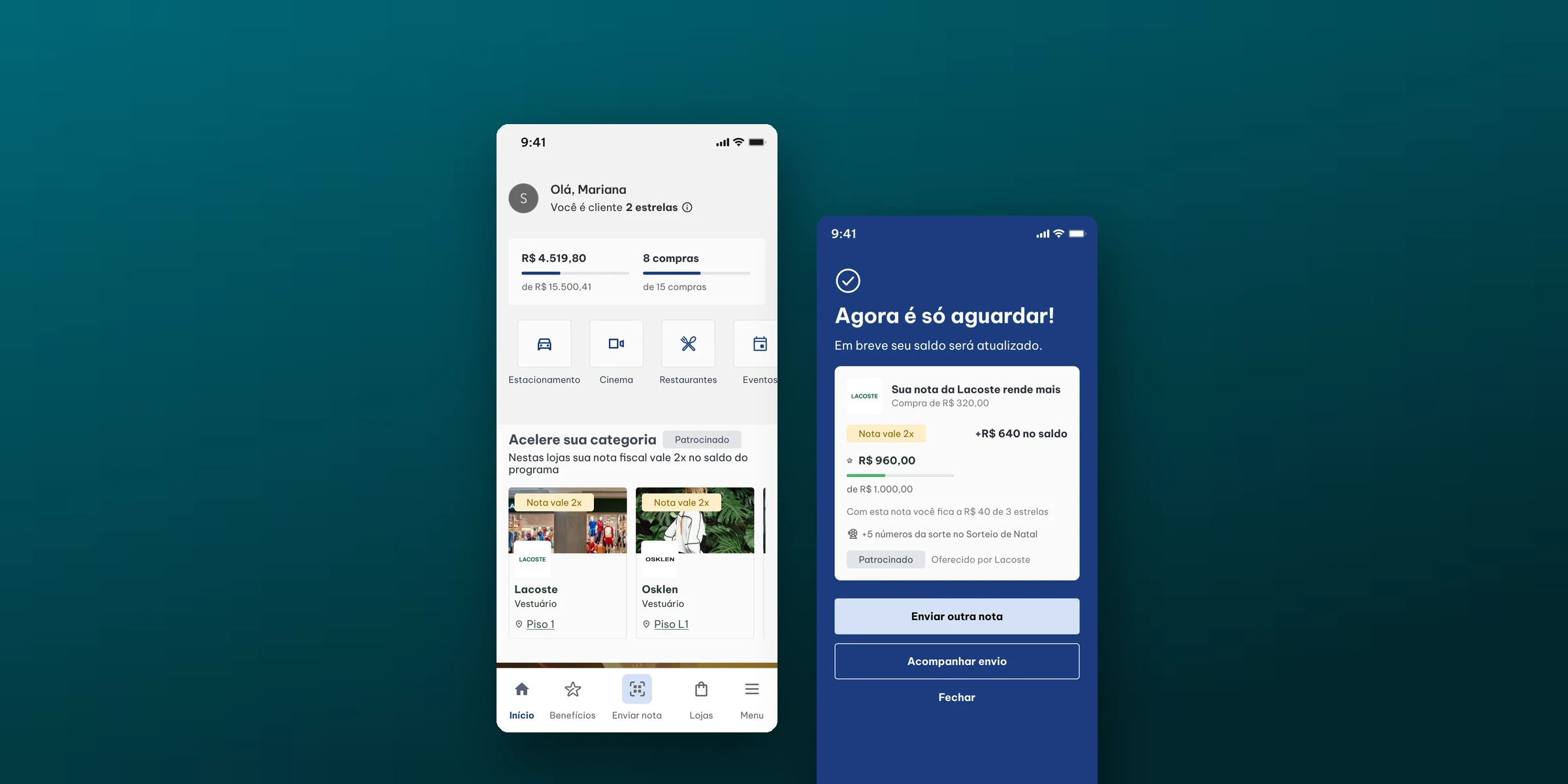
Summary
Bringing sponsored mechanics into the moments when customers use the app.
- Role
- Product Design Specialist. Mapping and redesign done by me
- Product
- Retail Media: brands advertising and sponsoring benefits on ALLOS channels
- Mechanics
- Category Accelerator and Extra Lucky Number
- Deliverables
- Customer journey mapping in the app, opportunity map and redesign of 5 screens with the app's design system
Context
ALLOS sells store owners sponsored mechanics within the app's benefits program. The purchase is recognized by the company tax ID (CNPJ) on the receipt the customer uploads.
01 Category Accelerator
Receipts from the sponsoring store count up to 2x toward the program balance, so customers move up a tier faster.
02 Extra Lucky Number
A purchase at the sponsoring store gives up to 5 extra numbers in the mall's prize draw.
Challenge
Find moments in the app journey where the product could support selling these mechanics: showing the brand's benefit when customers decide where to buy, when they upload the receipt and when they check what they earned.
Journey mapping
I mapped the end customer's journey in the app on my own, in 14 stages, from sign-up to prize draws. For each user action, the map records the squad in charge, the tools and integrations involved and the current screens. I went through the production app screen by screen and cross-checked it with the FAQs in the Monetization Hub.
- 153user actions mapped
- 177app screens surveyed
- 4product squads involved
- 25opportunities for brands: 9 ads and 16 sponsored benefits
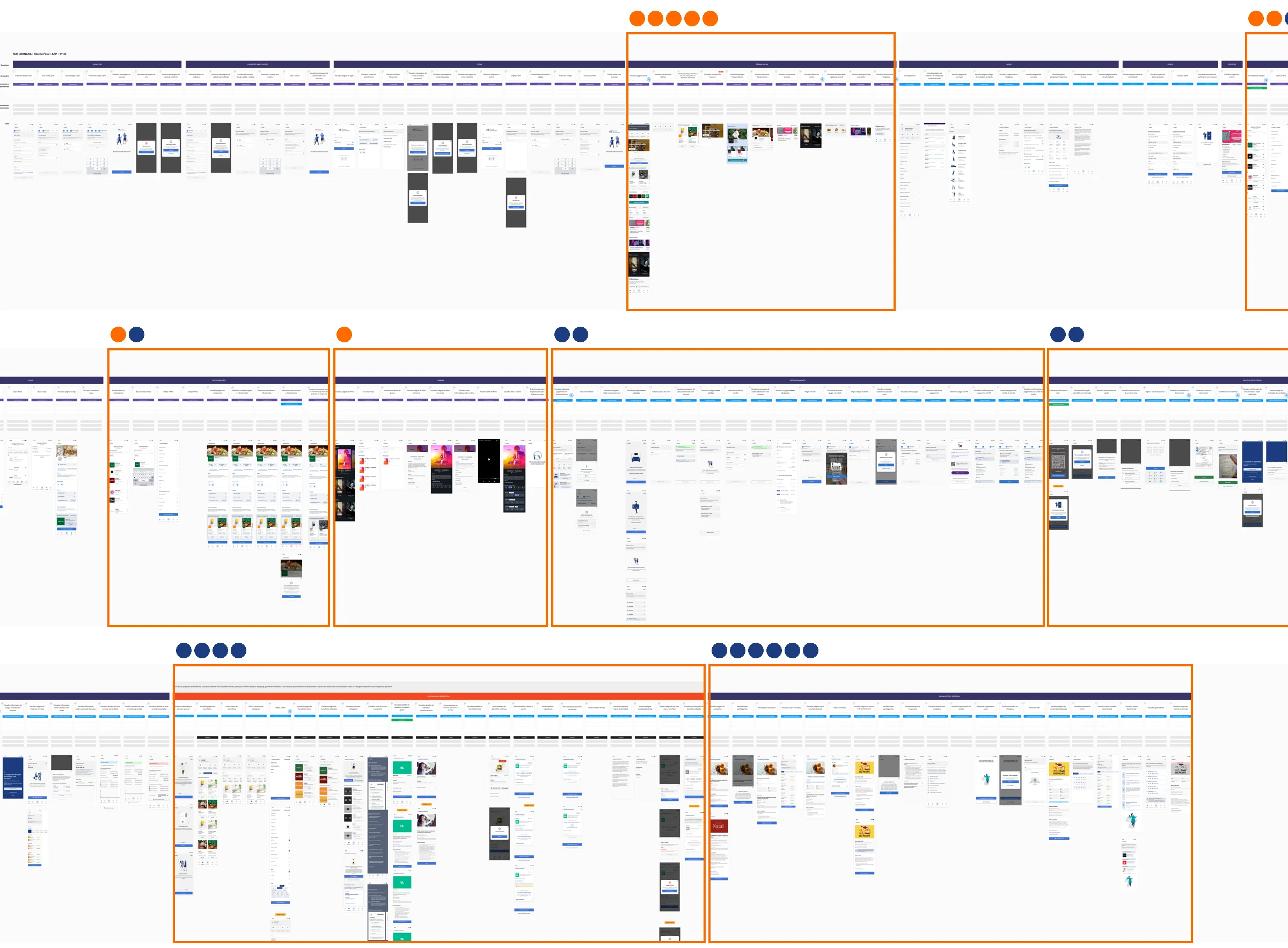
- Access
- Sign-up, simplified sign-up and login
- Navigation
- Home page, menu and profile
- Mall
- Events, stores, restaurants, cinema and parking
- Program
- Receipt upload, benefits program, campaigns, promotions and prize draws
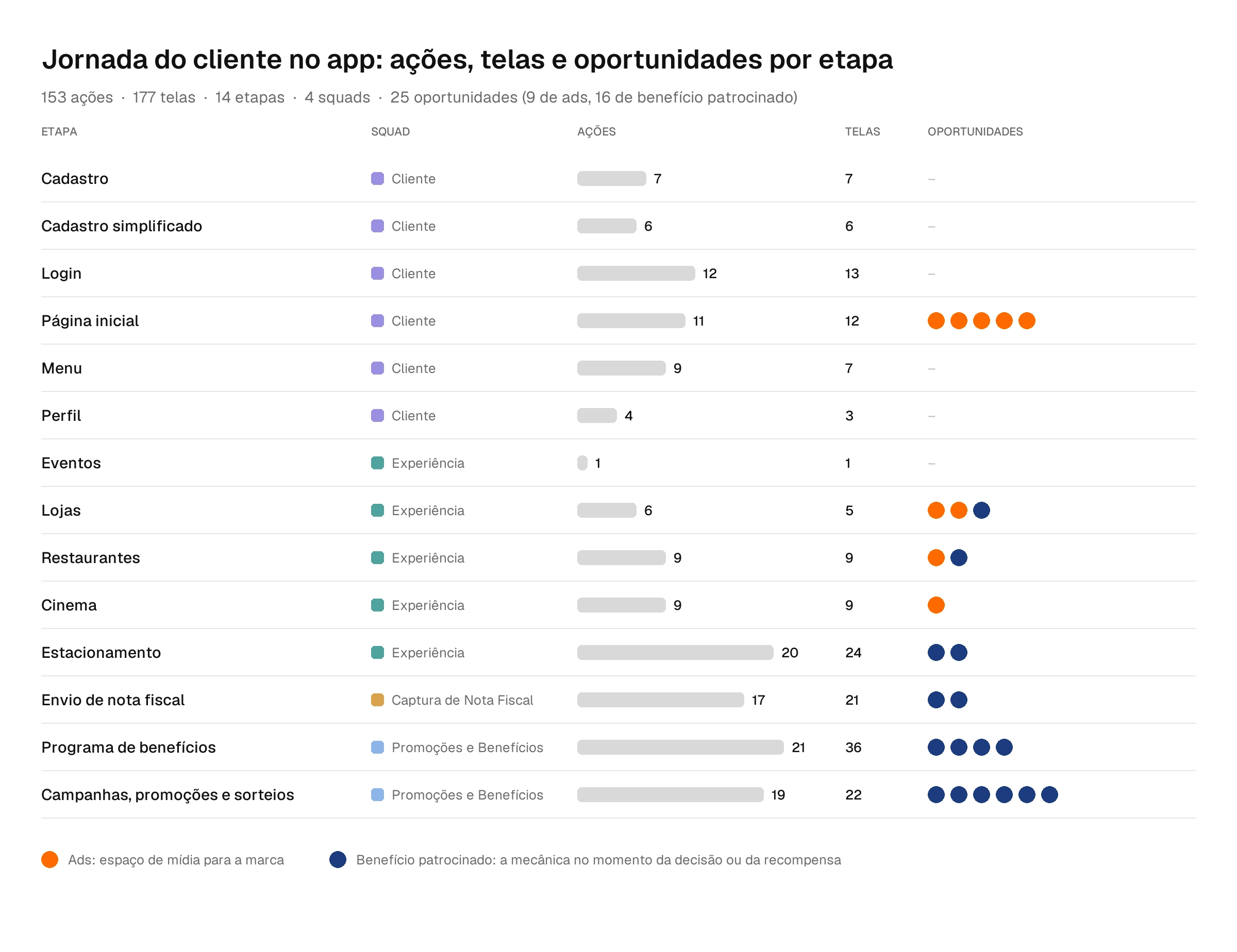
The program's three stages (receipt upload, benefits and prize draws) add up to 57 of the 153 actions and 79 of the 177 screens, and hold 12 of the 16 sponsored benefit opportunities. That is where customers are already thinking about balance, tier and prizes. The Customer Squad's six stages have 49 actions, but only the Home has room for the brand.
Teams involved
The map made it clear why sponsorship stayed in the banner: one mechanic cuts across several teams. One squad captures the receipt, another owns the balance and the draw, and a third owns the store page and the Home.
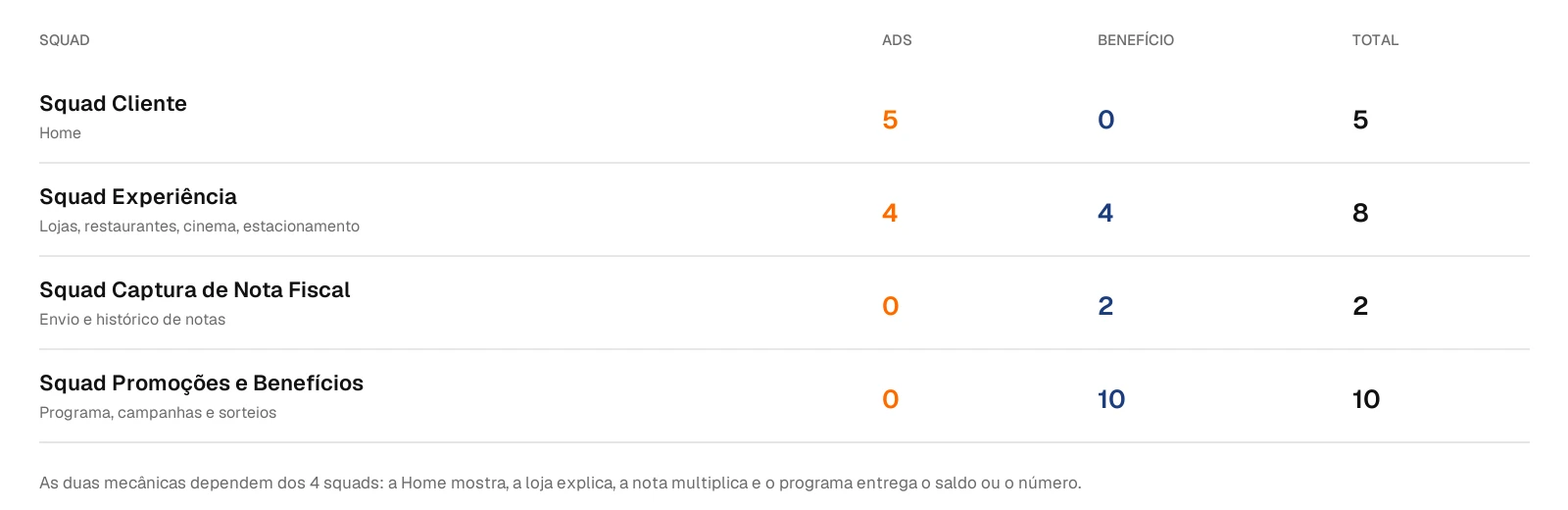
Of the 25 opportunities, 10 sit with the Promotions and Benefits Squad, 8 with Experience, 5 with Customer and 2 with Receipt Capture. The Home shows the brand, the store page explains the mechanic, the receipt multiplies and the program delivers the balance or the number.
Where the brand can appear
I found 25 spots in 8 of the 14 stages and split them into two types: ads, when the brand gets media space, and sponsored benefits, when the mechanic shows up at the moment the customer decides or receives the reward.
- Home page (5 ads)
- Banner carousel and the Our Brands, Restaurants, More options for you and Stay in the loop highlights.
- Stores (2 ads, 1 benefit)
- Store list and search with the sponsor highlighted; mechanic badge on the store page.
- Restaurants (1 ad, 1 benefit)
- Highlight in the list; mechanic badge on the restaurant page.
- Cinema (1 ad)
- Brand space on the movies page.
- Parking (2 benefits)
- Sponsored benefit when using a benefit and on the payment confirmation.
- Receipt upload (2 benefits)
- The "Now just wait!" confirmation shows the extra reward and the store that generated it; the receipt history shows the receipts that counted more.
- Benefits program (4 benefits)
- Benefits page, tier carousel, next tiers and benefit detail: how far to the next tier and which stores speed it up.
- Campaigns, promotions and prize draws (6 benefits)
- Campaign page, participating stores, prize draw page, lucky numbers, goals and stores that give extra numbers.
The goals screen already had the pattern the product needed: the brand and the reward together, in the place where customers follow the draw. The receipt-sent confirmation, almost empty, was the biggest wasted space.
Redesign
- Sponsored badge
- The design system's neutral Badge marks every space paid for by a brand, in ads and benefits, so customers know what is an ad.
- Mechanic badge
- The same Badge in other colors states the benefit in one line: yellow for "Receipt counts 2x" (Accelerator), blue for "+5 lucky numbers" (Extra Lucky Number).
- Store Card and goals
- The Store Card shows the sponsoring stores, with the Badge over the cover. Benefits Goals shows how far the receipt moved the customer forward.
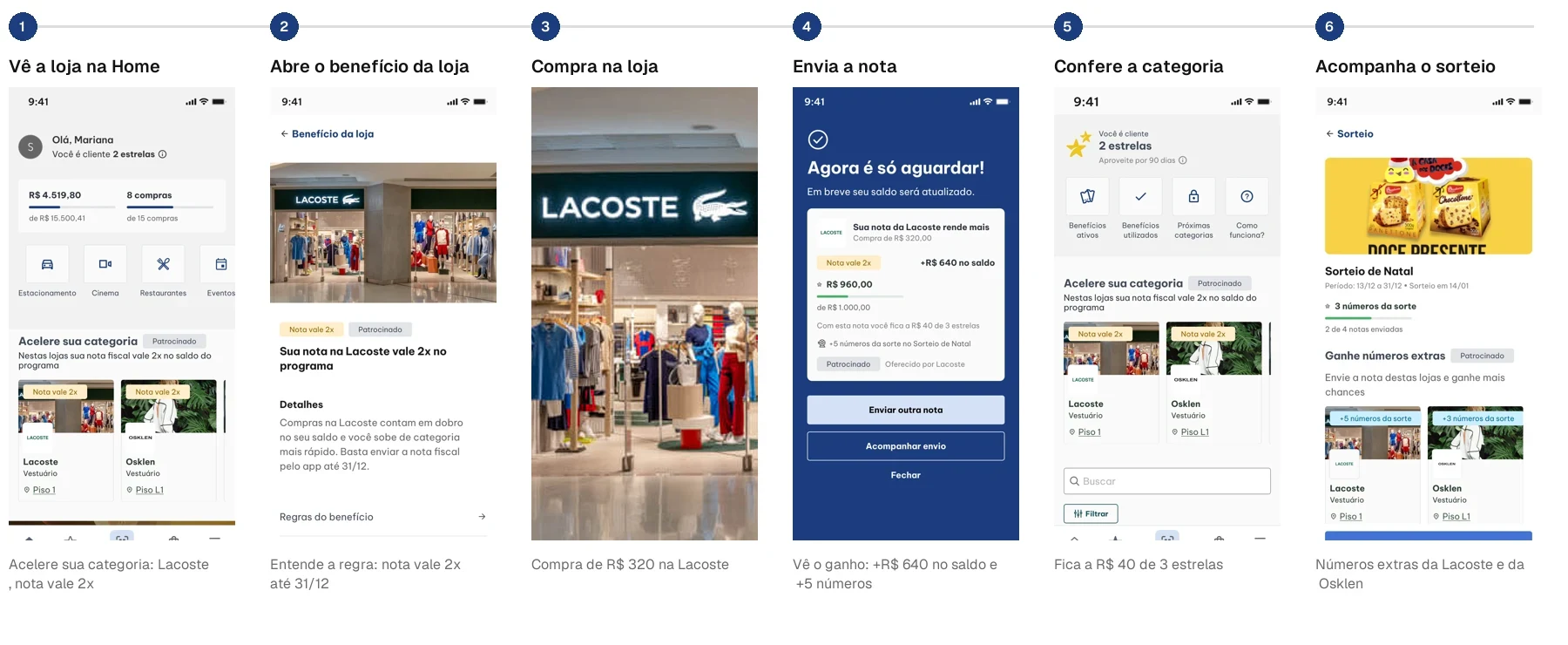
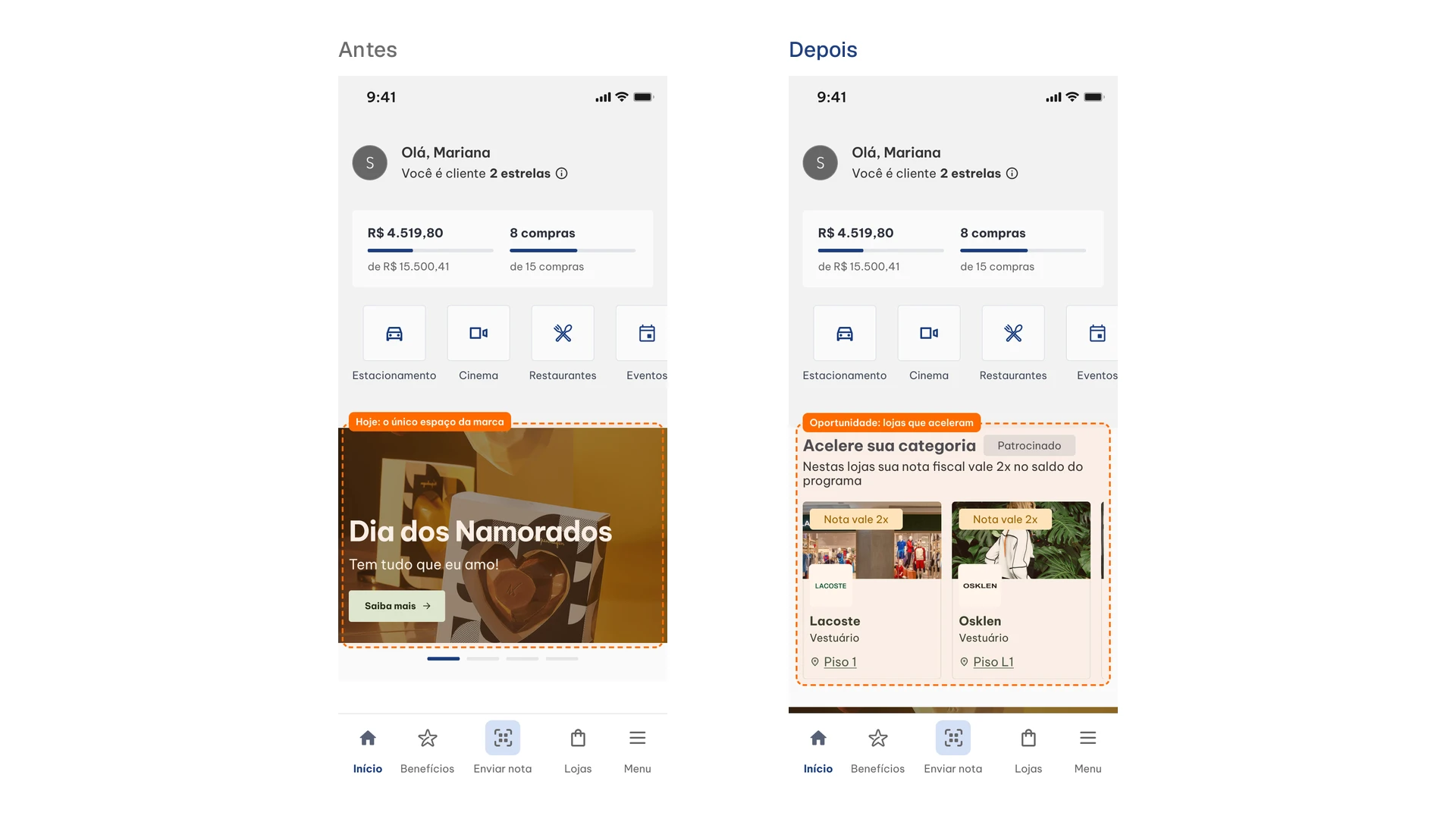
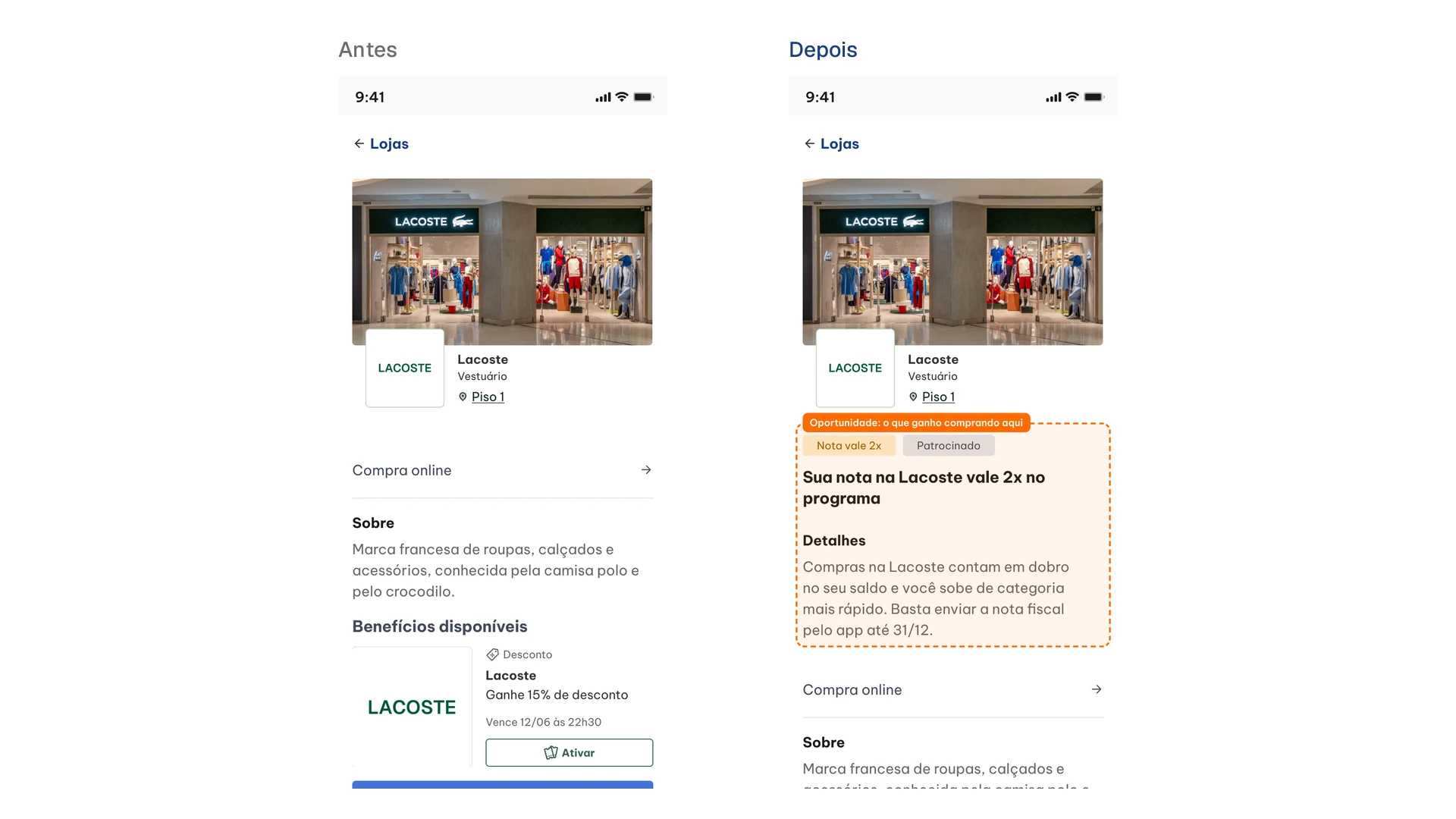
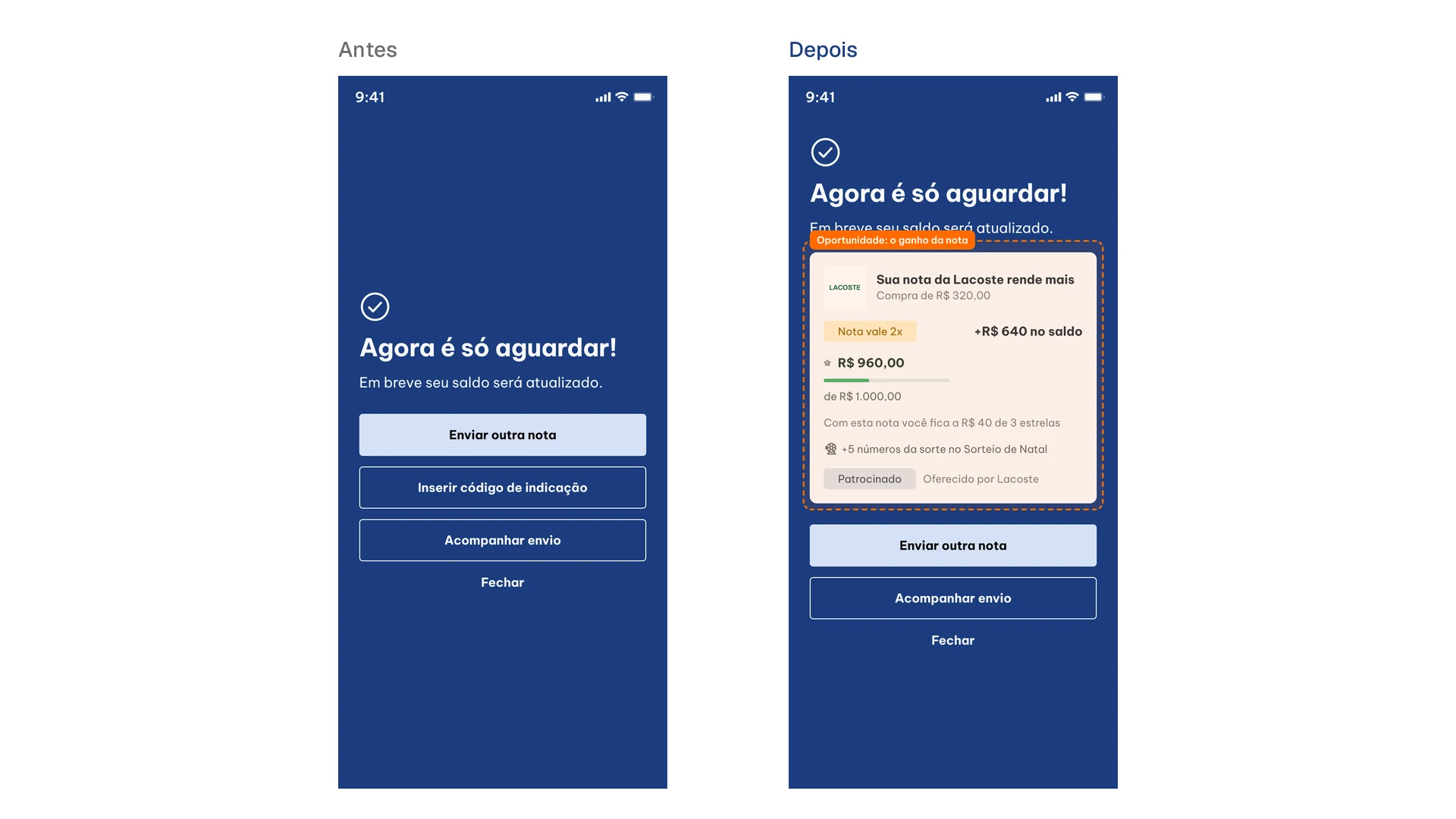
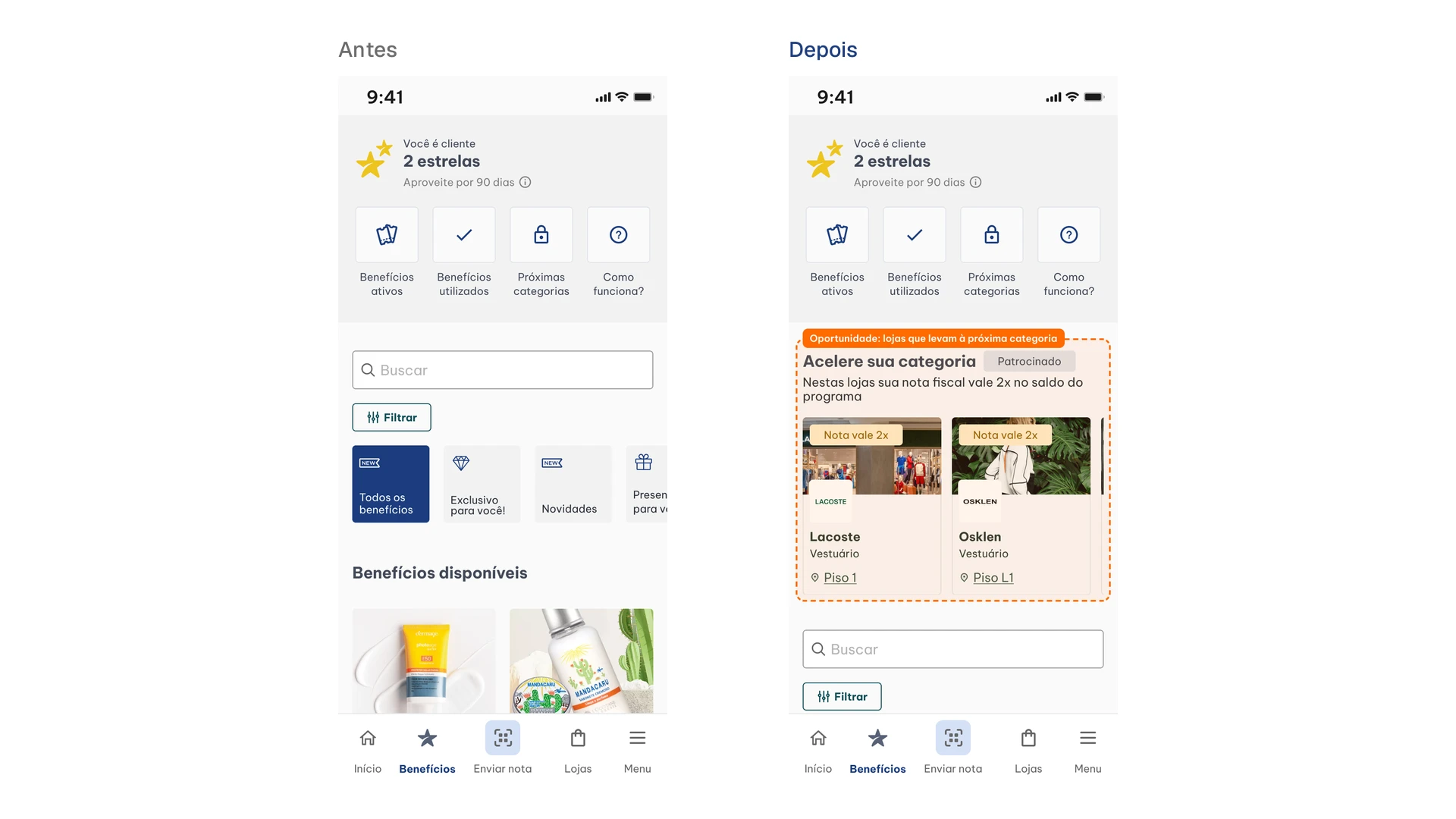
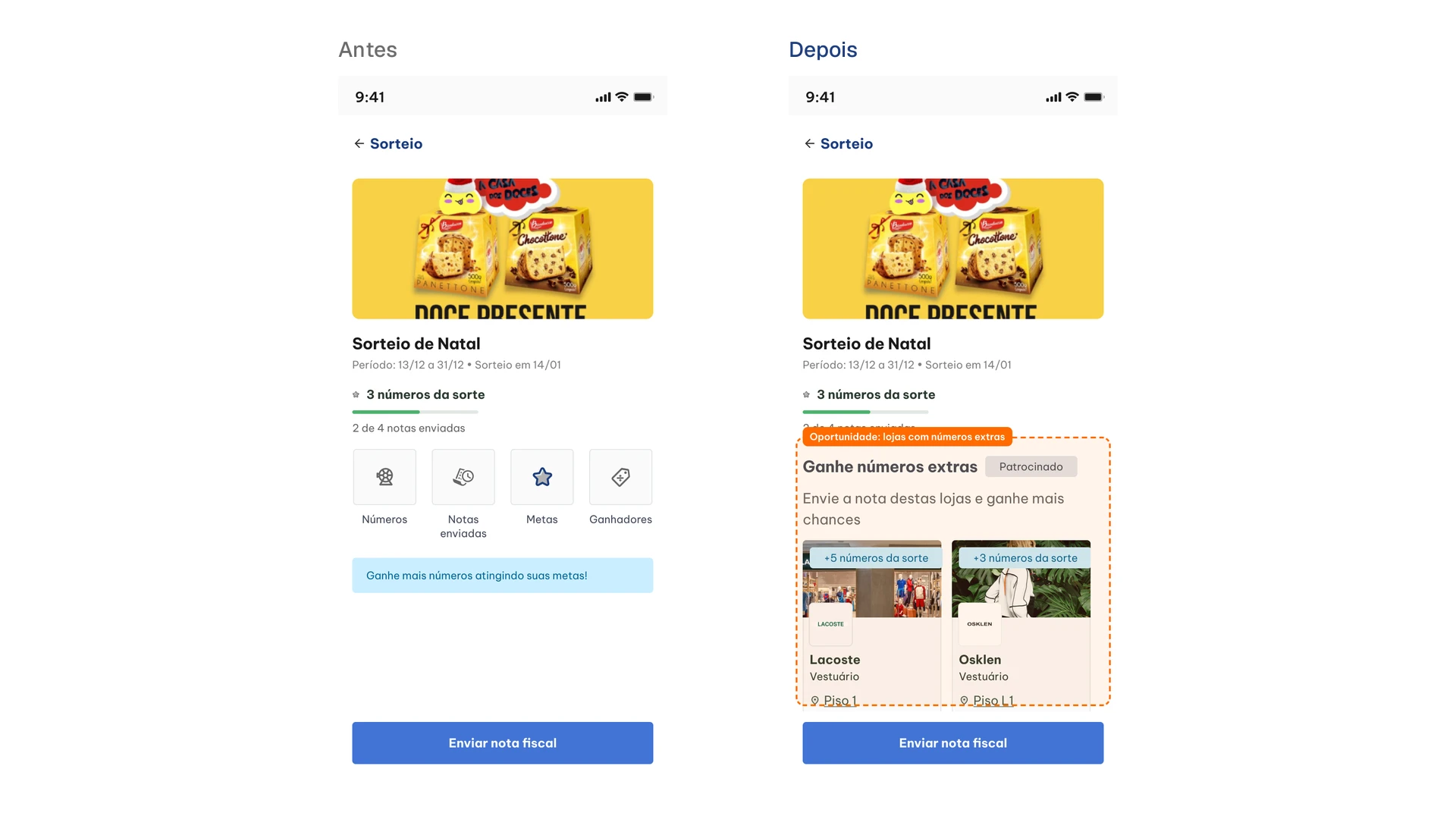
Before and after. In orange, the opportunity applied on each screen. Simulated values.
Operational framework
I improved the Retail Media operational framework: the path of a sponsorship slot, from closing the deal with the brand to the results report. Each stage has an artifact, and the rules come from the mechanics' commercial policy.
- 01
Sale and contract
Campaign guide with the rules of each mechanic. Accelerator: receipts count up to 2x toward the balance, monthly sponsorship, preferably for 3 months or more, up to 2 brands per mall. Extra Lucky Number: up to 5 numbers per receipt for up to 10 uploads, up to 2 slots per promotion, always from non-competing brands. The participation agreement is signed 45 days in advance.
- 02
Registration
Registration template with each store's CNPJ, which is how the system recognizes the receipt uploaded in the app, the eligible SKUs when the campaign is product-based, the period and the multiplier or number of extra numbers.
- 03
Onboarding
Material for store owners on how the mechanic works for customers, the promotion kit (Home carousel banner, push, email or SMS, social media and in-mall screens) and what they get at the end.
- 04
Campaign live
Technical checklist: updated CNPJ, assets published and, for Extra Lucky Number, the mechanic included in the promotion rules, managed by the mall. The Accelerator doesn't need registration with SPA/MF (the Ministry of Finance's prize regulator). When a receipt isn't recognized, the mall checks the CNPJ and opens a ticket to credit the benefit retroactively.
- 05
After-sale
A report with the activation numbers and photo proof of the assets, a dashboard with GMV, receipts uploaded and customers reached per store, and an NPS survey with the store owner.
Today about 75% of receipts are approved by the system in under 5 minutes, which makes the reward visible to customers right after the purchase.
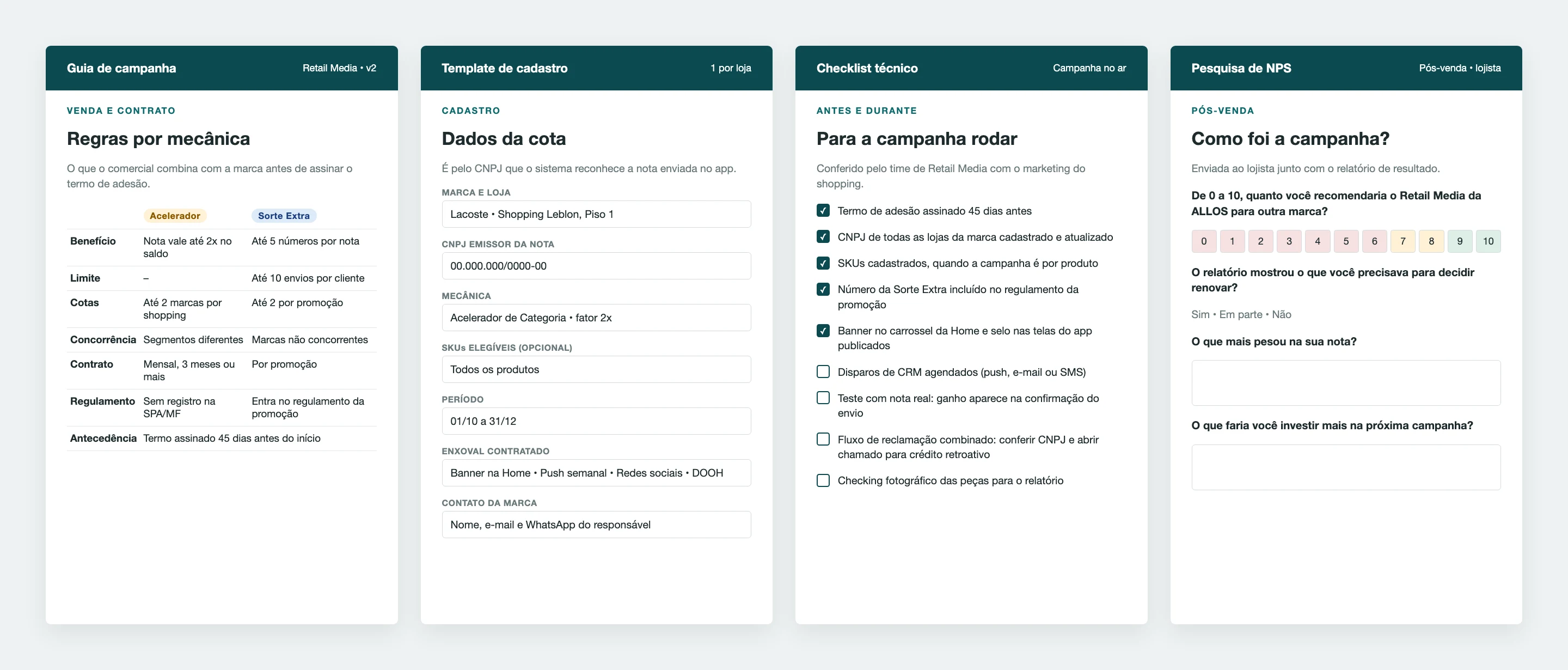
The NPS survey goes to the store owner along with the results report. Besides the 0 to 10 score, it asks whether the report helped them decide on renewal and what would make the brand invest more in the next campaign.
How to measure
For each new screen, the measure would be the one store owners already get in the after-sale report: receipts uploaded from the sponsored store, GMV and customers reached. In the app, what matters is how many times customers open the store's benefit from the Home or Benefits, and whether those who see the reward on the receipt confirmation buy again at the same store.
For this, I delivered a handoff with the event plan for each screen: what to measure, when it fires, why measure it, the priority and the attributes that go with it.
- Naming
- <screen><Object>_<action> in camelCase, with the actions view, click and swipe. Example: homeAccelerateStoreCard_click.
- When view fires
- Once per session, when at least 50% of the element is visible for 1 second.
- Global attributes
- SessionID, UserID and ShoppingID on every event, plus each event's own attributes.
- Priority
- P1 measures reach and interest in the brand's space. P2 adds context. P3 helps fine-tune the design.
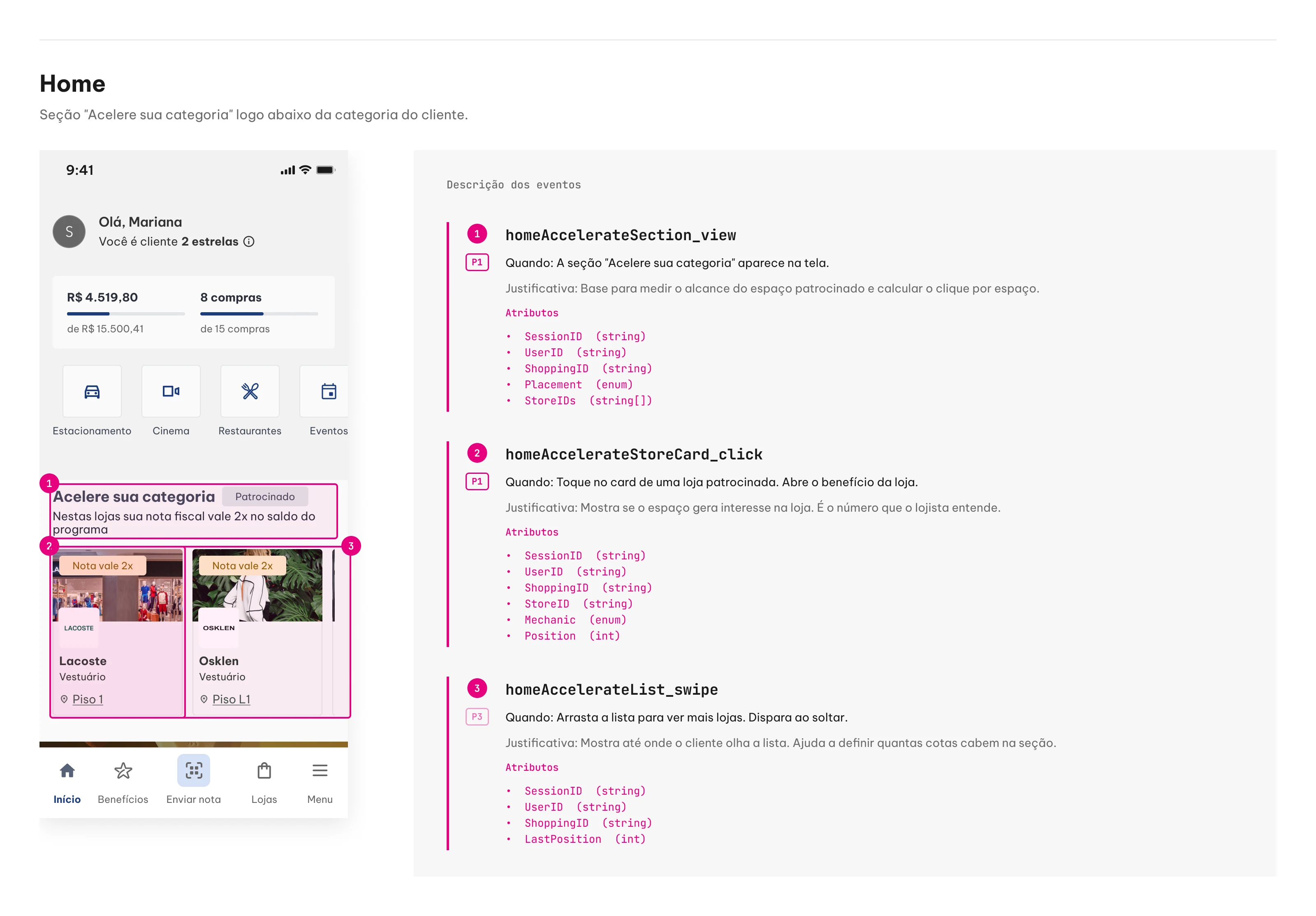
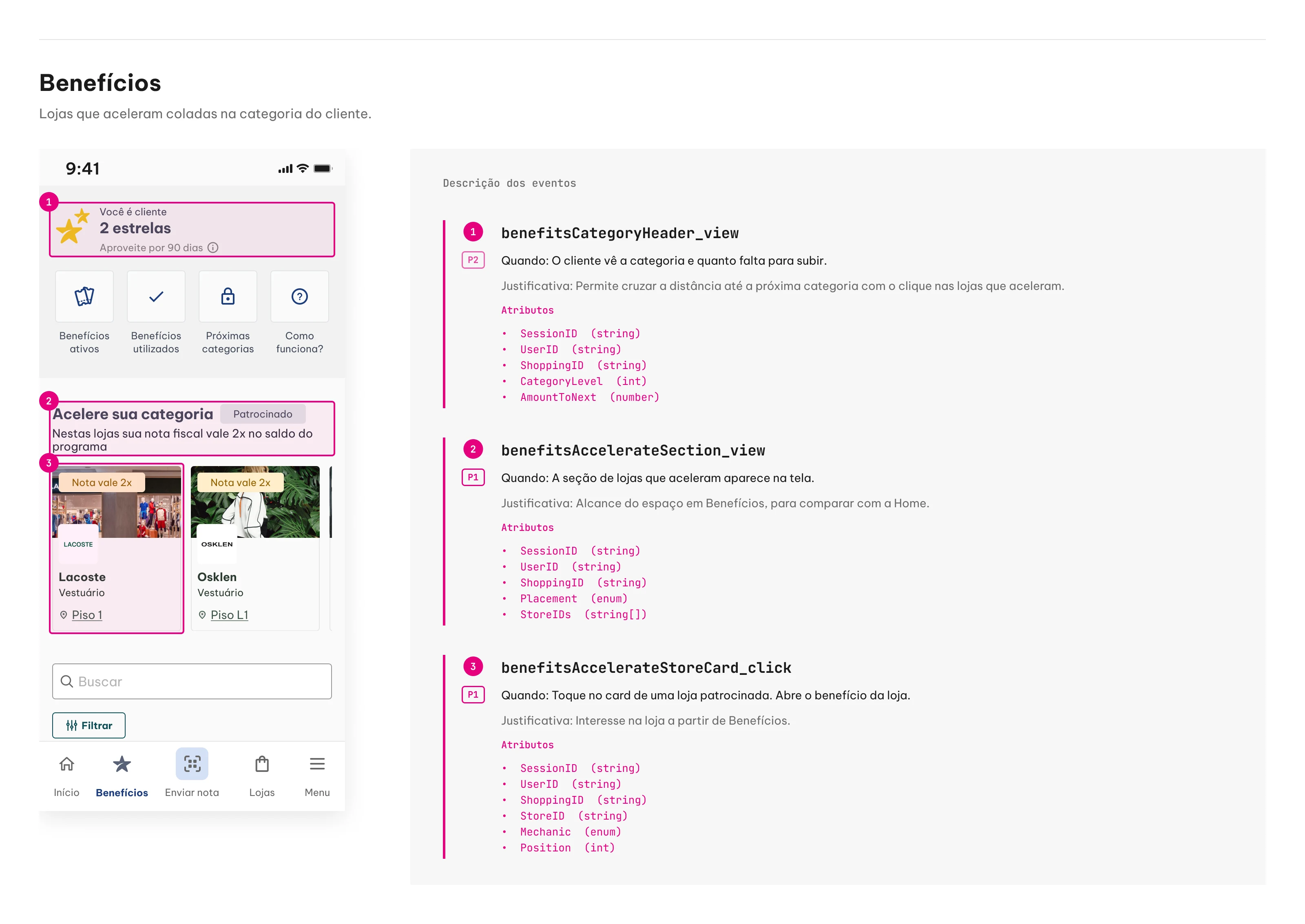
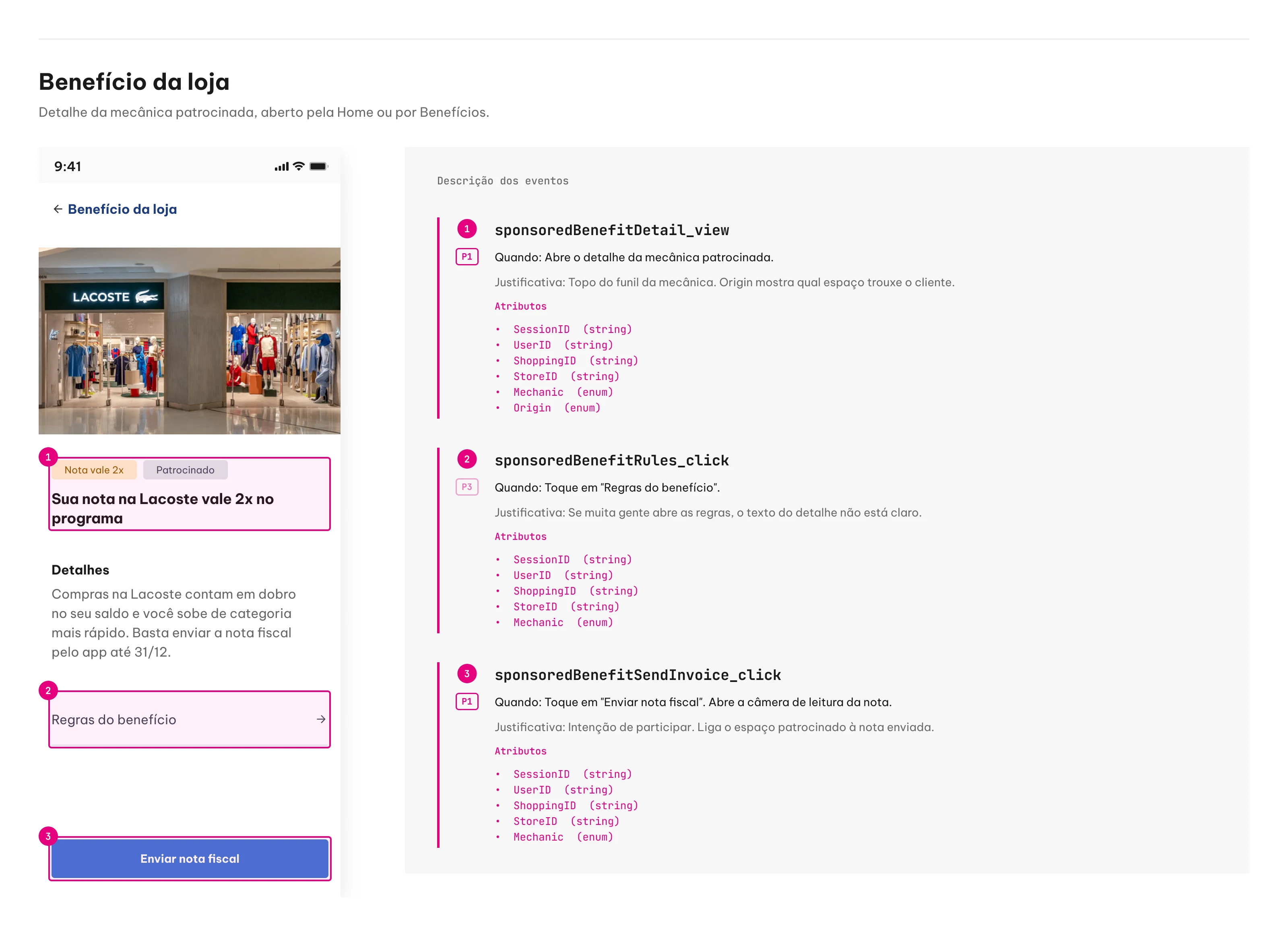
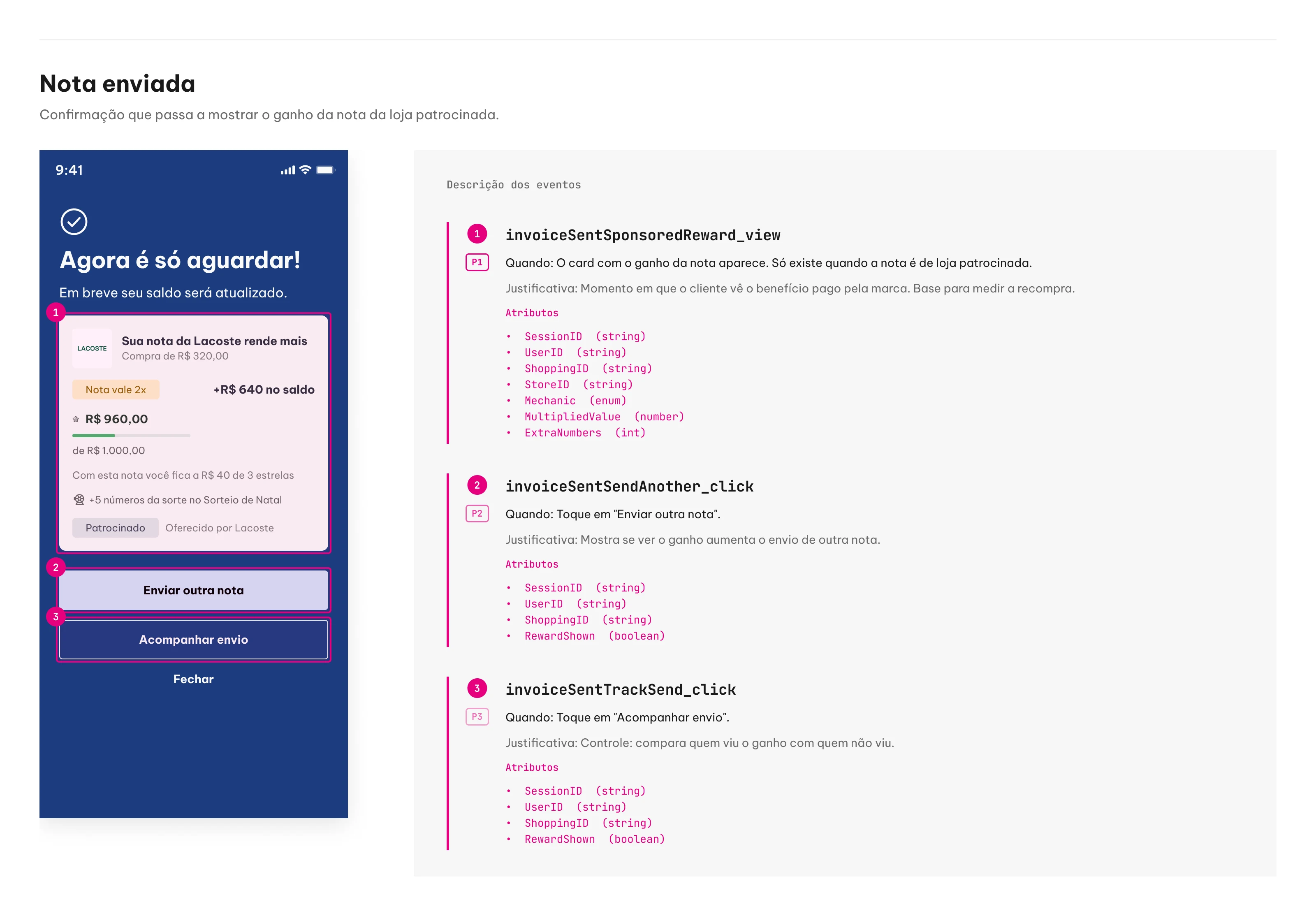
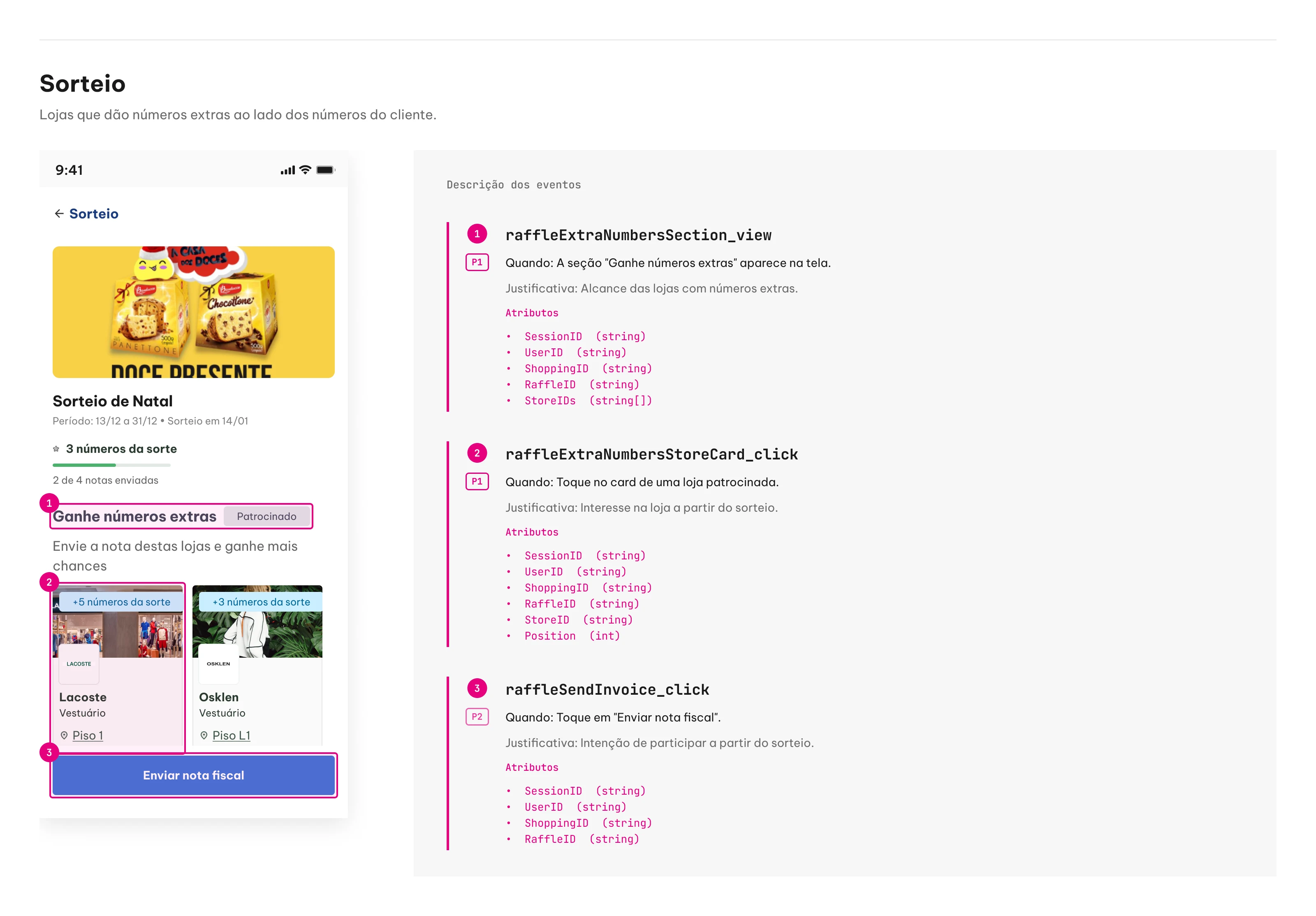
Handoff per screen: the measured elements numbered and, next to them, each event with when it fires, rationale, priority and attributes.
Both mechanics follow the same journey, and the events mark each step. The Mechanic attribute tells them apart.
- 01
Sees the store
Accelerator: "Boost your tier" sections on the Home and in Benefits. Extra Lucky Number: "Get extra numbers" section in the prize draw. In both, tapping the card sends StoreID and Position.
- 02
Understands the mechanic
sponsoredBenefitDetail_view, with Mechanic (accelerator or lucky_number) and Origin, which says which space the customer came from. Tapping "Upload receipt" marks the intent to take part.
- 03
Buys and uploads the receipt
No screen event: the system recognizes the store by the receipt's CNPJ, as it already does today, and applies the mechanic.
- 04
Gets the reward
invoiceSentSponsoredReward_view. In the Accelerator, MultipliedValue says how much the receipt added to the balance. In Extra Lucky Number, ExtraNumbers and RaffleID say how many numbers were added and to which draw.
What each mechanic answers:
- Reach
Accelerator: section views on the Home and in Benefits.
Extra Lucky Number: section views in the prize draw.
- Interest
Both: card clicks ÷ section views.
- Participation
Accelerator: store receipts with MultipliedValue.
Extra Lucky Number: store receipts with ExtraNumbers.
- Effect
Accelerator: the customer moved up a tier (CategoryLevel before and after).
Extra Lucky Number: the customer uploaded more receipts during the draw.
- Repurchase
Accelerator: a new receipt from the same StoreID within 30 days.
Extra Lucky Number: a new receipt from the same StoreID within the draw period.
In the data lake, events are matched to receipts by UserID and StoreID. That match produces, per store and per mechanic, the numbers in the store owner's after-sale report (receipts, GMV and customers reached), now showing how much of it came from the spaces in the app.
Wrap-up
The map lists where each mechanic can appear in the app and which squad owns each screen. The redesign shows how those screens look with sponsorship, using what the app already has.
Results
From January to June 2026, Retail Media mechanics brought in R$ 4.1 million of ALLOS's R$ 5 million in Monetization. The two in the redesign, Extra Lucky Number and Category Accelerator, accounted for R$ 3.8 million.
- R$ 3.2MExtra Lucky Number: 178 campaigns, 72 clients
- R$ 547KCategory Accelerator: 72 campaigns, 19 clients
- R$ 297KStatus Match: 8 campaigns, 2 clients
- R$ 5MALLOS Monetization across all products, from January to June 2026